A coding agent runs untrusted text (file contents, command output, tool results) against a privileged tool set. The design assumes the model can be wrong, or be talked into something, and puts a gate in front of every action.
Modes
| Mode | Setting value | Behaviour |
|---|---|---|
| Ask first | ask | Every edit and command asks |
| Auto-edit (default) | acceptEdits | Ordinary edits apply; commands ask, except a short list of exact read-only ones |
| Full auto | auto | Nothing asks |
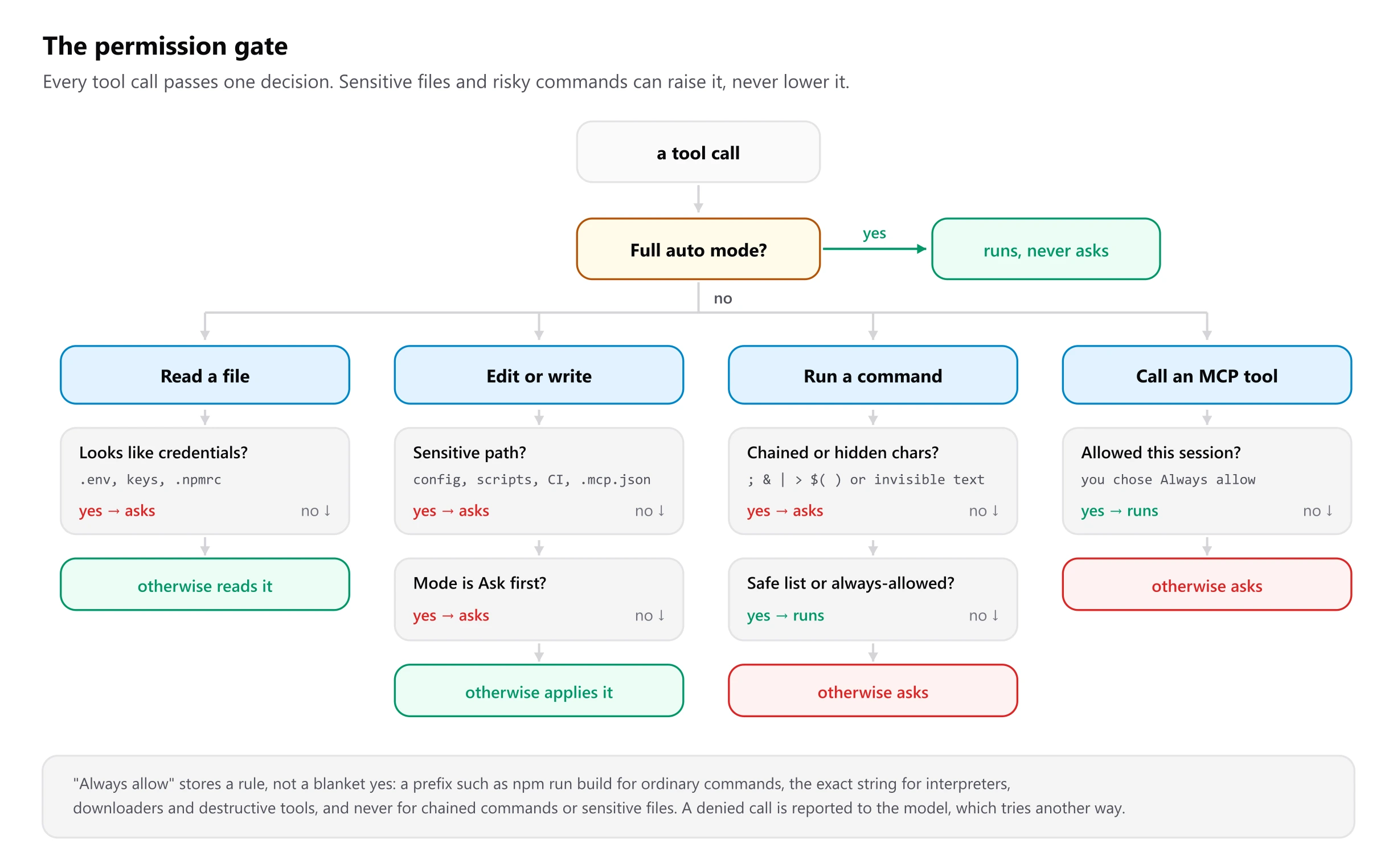
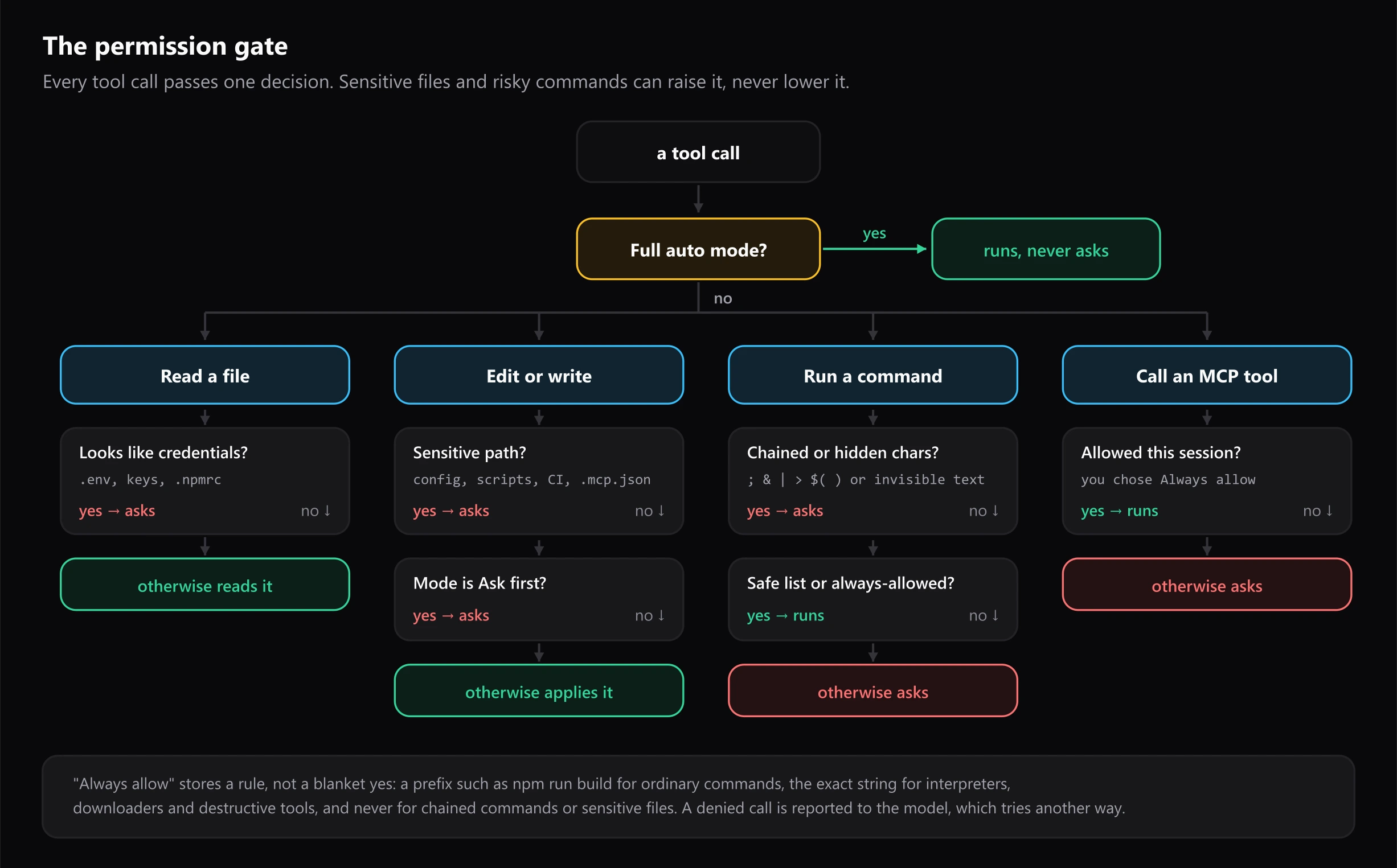
Outside Full auto, these always ask:
- Edits to sensitive paths:
.vscode,.git,.github,.gbs,.mcp.json,package.json,.npmrc,.envfiles, scripts (.sh,.ps1,.bat, …),AGENTS.md, and the linter, test and build configs that editor extensions run automatically (ESLint, Prettier, Jest, Vite, webpack, …). - Reads of likely credential files:
.env,.npmrc,.netrc, SSH keys and similar. - Commands with shell operators or invisible characters, because what runs might not be what the card appears to show.
- MCP tool calls, unless that tool was allowed for the session.
The safe list
A few commands run without asking in Auto-edit, matched exactly, arguments
included: git status, git log --oneline, git branch, pwd, ls,
dir, node --version and npm --version. Exact matching matters:
git diff is not on the list, because diff drivers in .git/config can run
any program.
"Always allow"
Choosing Always allow stores a rule for the session, not a blanket yes:
- for ordinary commands, a prefix such as
npm run buildorgit commit; - for interpreters, downloaders and destructive tools (
node,python,npx,curl,rm, …), only the exact command string; - for MCP tools, that one tool on that one server;
- never for chained commands or sensitive files.
Threats and defences
| Threat | Defence |
|---|---|
A repository's .vscode/settings.json redirects your code | Provider, model, endpoints, key, shell, permission mode, skills path and MCP servers are read from user settings only. The extension is disabled in untrusted workspaces. |
| Prompt injection from file contents or command output | The system prompt marks those as data; sensitive paths always ask; with the text protocol, tool calls are parsed only from a trailing block, never from prose or code fences. |
| A repository adding skills or MCP servers | Used only after a one-time confirmation per workspace; MCP consent is tied to the exact commands, so a change asks again. .gbs/ and .mcp.json are sensitive writes. |
| An API key sent to the wrong host | The key is bound to the origin it was saved for, and authenticated requests refuse redirects. |
| Code leaving the machine unnoticed | One-time consent per remote destination, and a cloud badge on the model chip. |
A planted git.bat or a repository-configured hook | Windows current-folder program lookup is turned off for commands, and git's core.fsmonitor is forced off. |
| Secrets leaking into commands | Secret-looking environment variables are removed from the command environment; credential files are skipped by search and gated for reads. |
| Escaping the workspace | Paths are resolved through symlinks and junctions before the containment check. |
| An approval that reads as harmless | The full command is shown, with chaining, network access, redirects and invisible characters called out. |
| Runaway work | Caps on subagents, response size, stalled streams and file size; a guard on regular expressions in the fallback search. |
The assumption everything rests on
Only your chat messages are instructions. File contents, tool results and command output are data. The system prompt says so, and the permission gate assumes the model may get it wrong anyway. No model is immune to prompt injection: read approval cards carefully in unfamiliar repositories, and avoid Full auto there.
Reporting a vulnerability
Report privately through GitHub security advisories, never in a public issue. The security policy lists what is in scope.